Your music.
Your ringtone.
Import any song, trim the perfect part, and set it as your ringtone. All on iPhone, in under a minute.
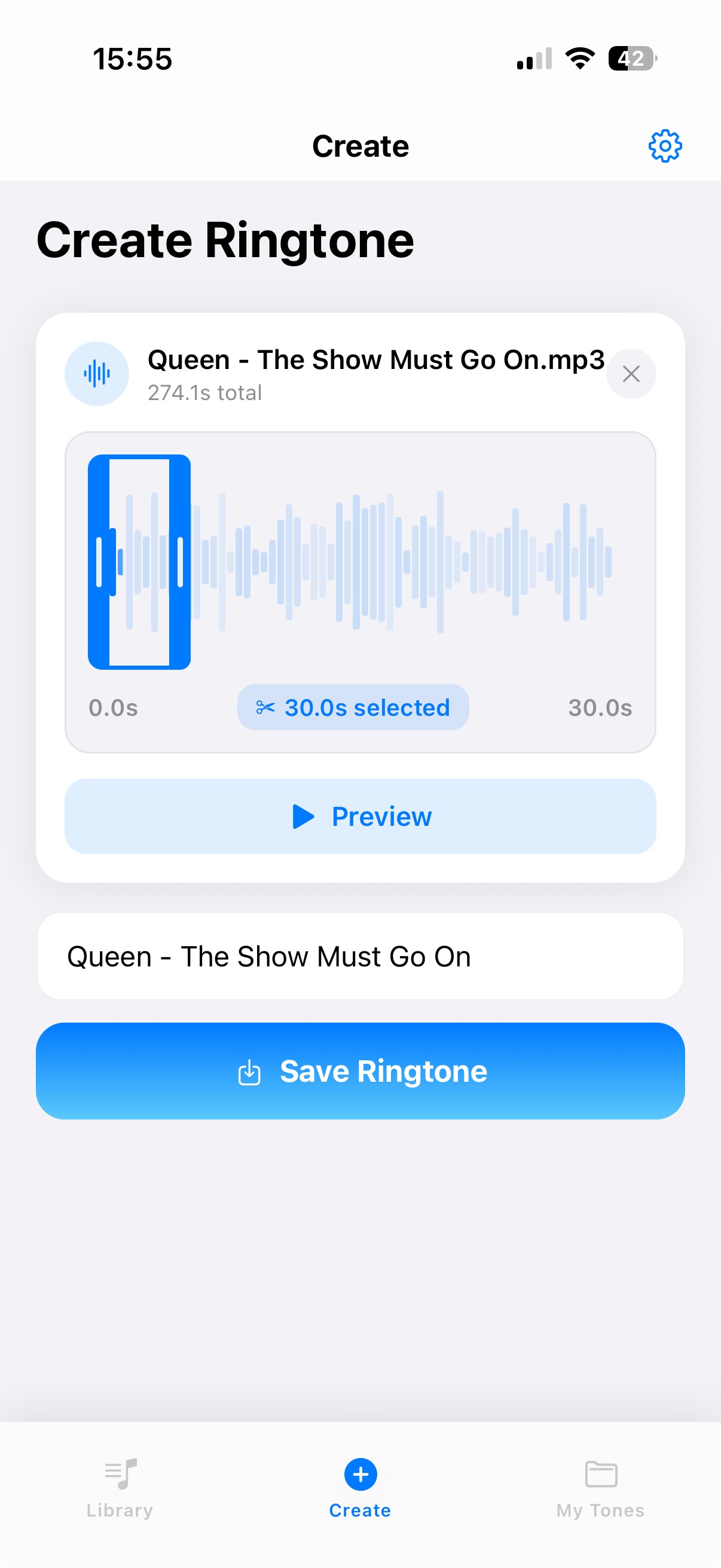
Import. Trim. Preview. Done.
Import
Pick any audio from Files, voice memos, or local library.
Trim
Visual waveform editor. Drag handles to the perfect section.
Preview
Listen before you export. Make sure it sounds right.
Export
Save and set as ringtone directly from iPhone.
Trim by sight,
not by guess
The waveform shows your entire track. Drag handles to select the exact 30 seconds you want.
100% iPhone
No cables. No iTunes. No desktop workflow. Everything happens on your phone.
Import Anything
Songs, voice clips, audio files. Import from Files or any local source.
Instant Preview
Hear exactly what your ringtone will sound like before you export.
Premium Tones
Browse curated, high-quality ringtones ready to use right away.
ads, pop-ups, or interruptions
Clean experience from start to finish. Your workflow, unbroken.
Questions
Do I need a computer? +
No. ToneMaker handles everything on your iPhone — import, edit, preview, and export. No desktop tools required.
Can I import my own songs? +
Yes. Import from Files, voice memos, or any audio source on your device. Then trim the exact section you want.
Does ToneMaker include ready-made tones? +
Yes. A curated collection of premium ringtones is included — use them right away, no editing needed.
Is ToneMaker free? +
Yes. ToneMaker is free to download on the App Store.
Your ringtone.
Your identity.
Create your first custom ringtone in under a minute. Free, on iPhone.
Download Free